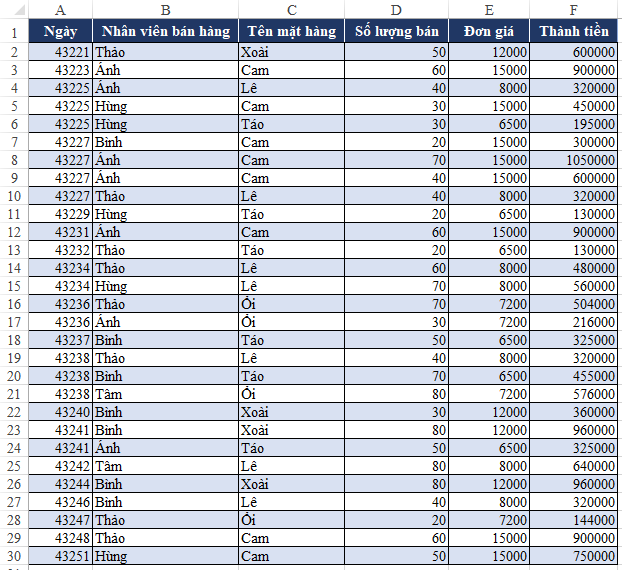
Tổng hợp theo tên nhân viên xuất hiện ở nhiều cột

Câu hỏi:
Anh/Chị Chỉ giúp em có cách nào tổng hợp tên của những người có trong bảng khi tên của họ xuất hiện ở nhiều cột ạ. 2529
https://docs.google.com/spreadsheets/d/10ATsN6Y2eEXE63pluUw6AFPDWs6csWhX/edit#gid=917994605
Em cảm ơn
Trả lời: Bạn có thể tham khảo công thức này nhé:
=SUMIF($D$4:$Q$19,$D23,$F$4)Kết quả:
2530
Chúc các bạn thành công!
Nếu có câu hỏi hoặc vướng mắc, các bạn vui lòng phản hồi tại đây để mình giải đáp nhé.
Để thảo luận các vấn đề liên quan Excel – Nhân sự vui lòng tham gia nhóm dưới đây:
HỖ TRỢ NHANH
<table border="0" cellpadding="2" cellspacing="0" width="100%">
<tbody>
<tr align="left">
<td>
<a target="_blank" href="https://zalo.me/g/ecwlkd061">
<img width='22' style="padding-right: 8px; float: left; margin-bottom: 5px;" border="0" src="styles/default/xenforo/icon-zalo_2.png">SprinGO Excel Nhân sự</a>
</td>
</tr>
<tr align="left">
<td>
<a target="_blank" href="https://zalo.me/g/oloevi272">
<img width='22' style="padding-right: 8px; float: left; margin-bottom: 5px;" border="0" src="styles/default/xenforo/icon-zalo_2.png">Pháp Luật LĐ-BHXH-TNCN</a>
</td>
</tr>
<tr align="left">
<td>
<a target="_blank" href="https://zalo.me/g/wwxwzj495">
<img width='22' style="padding-right: 8px; float: left; margin-bottom: 5px;" border="0" src="styles/default/xenforo/icon-zalo_2.png">HR – English -SprinGO</a>
</td>
</tr>
<tr align="left">
<td>
<a target="_blank" href="https://zalo.me/g/vlchmj637">
<img width='22' style="padding-right: 8px; float: left; margin-bottom: 5px;" border="0" src="styles/default/xenforo/icon-zalo_2.png">Kiến thức và Kỹ năng Nghề Nhân sự</a>
</td>
</tr>
<tr align="left">
<td>
<a target="_blank" href="https://zalo.me/g/gzxphj104">
<img width='22' style="padding-right: 8px; float: left; margin-bottom: 5px;" border="0" src="styles/default/xenforo/icon-zalo_2.png">Share Job + Share CV</a>
</td>
</tr>
<tr>
<td>
<a href="skype:kienthucnhansuthucte?chat">
<img width='22' style="padding-right: 8px; float: left; margin-bottom: 5px;" border="0"
src="styles/default/xenforo/icon-skype.png">Hỗ trợ trực tuyến – Skype</a>
</td>
</tr>
<tr>
<td>
<a href="https://msng.link/o/?kienthucnhansuthucte=fm">
<img width='22' style="padding-right: 8px; float: left; margin-bottom: 5px;" border="0"
src="styles/default/xenforo/fb_messenger.png">Hỗ trợ trực tuyến</a>
</td>
</tr>
<tr>
<td>
<b>
<img width='22' style="padding-right: 8px; float: left; margin-bottom: 5px;" border="0"
src="styles/default/xenforo/tell-icon.png"></b> <span style="color: #1c63c4;
font-weight: bold;">0984 39 43 38</span>
</td>
</tr>
<tr>
<td>
<b>
<img width='22' style="padding-right: 8px; float: left; margin-bottom: 5px;" border="0"
src="styles/default/xenforo/phone-icon.png"></b> <span style="color: red;
font-weight: bold;">0969 79 89 44</span>
</td>
</tr>
</tbody>
</table>

Thiết kế Tổng đãi ngộ (Total Rewards) theo khung SHRM
Khóa học “Thiết kế Tổng phần thưởng (Total Reward) chuẩn khung SHRM” giúp bạn nắm vững toàn bộ hệ thống đãi ngộ theo chuẩn...
Xem khóa họcBạn nên đọc

Công thức mảng trong Excel

Trích lọc dữ liệu trùng lặp trong nhiều cột nhiều sheets
Cách thay thế công thức bằng kết quả hoặc giá trị trong Excel
HƯỚNG DẪN VBA CƠ BẢN CHO NGƯỜI MỚI BẮT ĐẦU

Macro gộp dữ liệu nhiều sheets Excel vào 1 sheet